Officer safety
Help arrives where it's needed, fast.
- Duress button sends the officer's name and exact location
- Alerts when people enter areas they shouldn't or groups gather
- Live location of every officer and person in custody
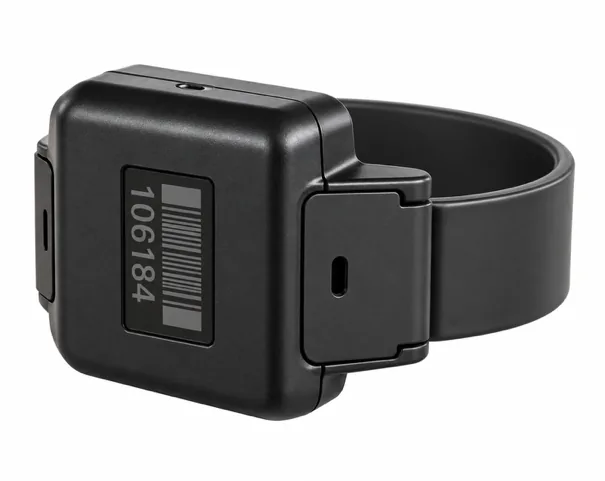
Every person in custody wears a tamper-detecting iLink tag. Every officer carries a duress device. Sensors across the facility feed one live dashboard, so staff know where everyone is, who they were with, and who needs help.
Agencies are asked to do more with fewer people, while the dangers to officers and to people in custody keep growing.
fewer correctional officers employed by state governments in 2023 than in 2012, leaving fewer eyes on the floor.
Bureau of Labor Statistics, 2012–2023contraband phones recovered by prison authorities in a single year.
Urban Institute, 2024rise in deaths from drug and alcohol intoxication in state and federal prisons, 2001 to 2019.
Bureau of Justice Statistics, 2021And the work itself hasn't changed. Counts, searches for people, and handwritten logs still take hours every shift, hours that should go to supervision.
Each person in custody wears a secure, tamper-detecting iLink tag, and officers carry a safety device that can be belt-worn or worn as a lanyard. Staff see everything in a browser, and training takes under an hour.
Help arrives where it's needed, fast.

See how contraband moves, and who moves it.
Hours of manual work, handled automatically.
Safer, healthier days for people in custody.
DIG installs and maintains everything. Your staff only need a browser.
Secure, waterproof, and tamper-detecting. Worn on the ankle.
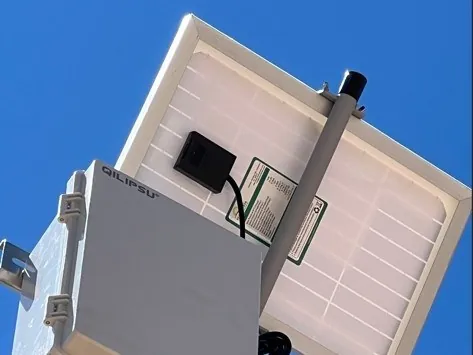
Placed throughout buildings and grounds by DIG, on a network separate from yours.
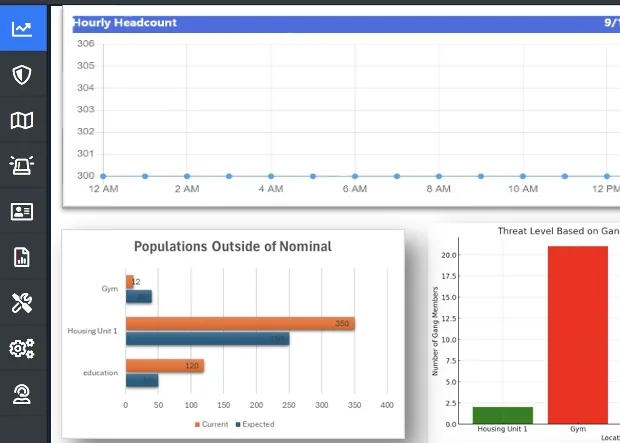
Counts, locations, alerts, and reports update on their own, and central office can see every facility.
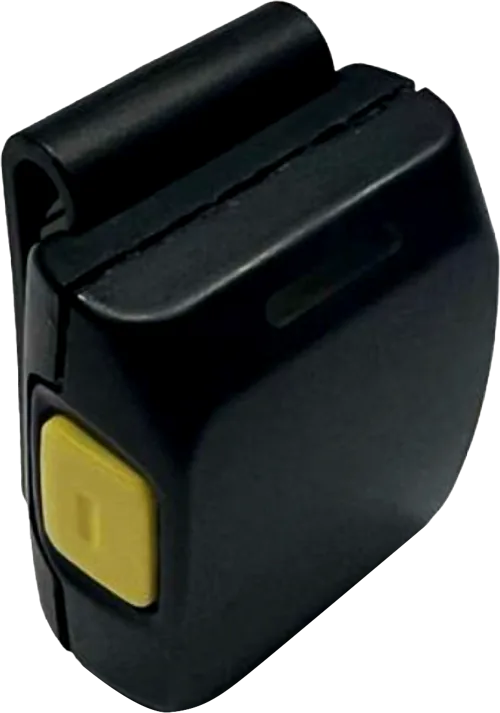
Alerts reach the staff who need to act, and every officer carries a duress device, worn on the belt or as a lanyard.
Each iLink tag takes the place of a stack of manual checks, paper records, and ID cards.
Continuous roll calls, without interrupting activities, that name anyone not accounted for.
EfficiencyNames everyone near an event, to match against video and trace contraband.
ContrabandNear real-time location by unit, with alerts for restricted areas and gatherings.
SafetyA button on the officer's belt or lanyard sends their name and location to responders.
SafetyMedication receipt recorded against each person, through your pharmacy system.
WellbeingThe tag serves as each person's ID for commissary purchases, through your commissary vendor.
EfficiencyEach person's tag is their ID at meal lines, doors, and checkpoints. It stops double servings and ID swapping, and gives people a reason to keep the tag on.
EfficiencyHeart rate and body temperature confirm the wearer is alive and flag distress.
WellbeingCounts, alarms, and locations update on their own. Staff act on what needs attention instead of collecting it by hand.
| 14:06 | Tamper alert · Resident 48213 · B-wing, cell 12 | Investigating |
| 14:02 | Officer duress · Housing Unit B, dayroom | Responding |
| 13:41 | Unauthorized area · Resident 51907 · Yard gate | Cleared |
| 13:15 | Group gathering · Gym, 6 residents | Cleared |
When counts run on their own, the hours officers spent counting go back to supervision.
Automating half of the daily headcounts frees about 120 officer-hours a day. That's the equivalent of:
Based on 6 daily counts (3 automated), 20 staff-hours saved per count per 1,000 beds, 2,080 hours per position, and $23 an hour base pay.
An alert that known gang members had entered an area they didn't belong let an officer break up the group before violence occurred. They were carrying weapons.
A tag-removal alert led to the capture of two people attempting escape before they reached outside help.
An officer used iLink location data to identify the people making alcohol inside the facility.
Location history and proximity records show who was where, and with whom. Investigators can trace contraband to the people behind it, and staff are alerted when people gather or enter areas they shouldn't.
The tag that counts and locates also helps keep people apart who shouldn't be together, keeps an accurate record of each person's day, and watches for medical distress.
Alerts when groups gather or someone enters an area they shouldn't, and a record of who was near whom supports keep-separates and PREA investigations.
Out-of-cell time, meals, medication, and programming are logged automatically, so the record holds up to standards reviews and grievances.
Automated counts can replace some manual counts, and staff can find a person without searching the unit.
Liveness and vital-sign monitoring flags possible overdose or illness, so staff can respond sooner.
Many modernization projects put the same manual work on a tablet. The records move online, but officers still walk the count, search for people, and fill in the logs. iLink changes the work itself.
Same manual work, now on a screen.
The work happens on its own.
The people behind DIG fielded the first GPS tracking system designed for offenders in 1995, then grew that company, Pro Tech Monitoring, into the market leader before its acquisition by 3M. iLink brings that experience inside the facility.
Agency contracts from that earlier work, signed between 2001 and 2010, are still active today. About DIG →
Agencies, oversight bodies, and families ask good questions about what iLink records. Here are the short answers.
Each tag reports its location and its status, including tamper alerts. The system also logs alarms, meal and medication events, and the vital-sign readings used for liveness and wellness alerts. It does not record audio or video, and it does not capture the content of calls or messages.
The agency does. DIG hosts it in Microsoft Azure, encrypted, and iLink runs on its own network, separate from the facility's.
Only staff the agency authorizes. Access is role-based, so each person sees what their job requires.
Retention follows the agency's own records schedule.
No. It takes counting, searching, and paperwork off officers' plates so they can spend that time supervising people and responding when someone needs help.
A DIG founder will walk your team through results, options, and implementation, and respond within one business day. For the security of the facilities we serve, we share technical and security details only with agency staff, in a private briefing.